- UMotion - Animation Editor
-
 Questions

Can't import a standalone animation clip into Umotion
I wanted to base my UMotion animations on the idle pose of my character.
UMotion starts animations from a T POSE (or from the default pose of a model I presume)
However that seems unnatural to me and I was hoping to start them from the idle pose clip I use for my character.
But there's just no way to force UMotion to load that clip.
I do the Import Clips dialog and I get this error:
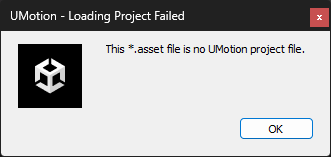
Is there no way to start the animation from an idle animation? The bone positions/rotations are quite different than in T POSE, so starting it from idle would achieve a smoother, cleaner effect. I saw the import animation tutorial but I think it imports an FBX file there, meanwhile Im importing a standalone animation clip (*.asset extension).
Answer

Hi,
thank you very much for your support request.
The initial pose that is used in the pose editor is called the "Reference Pose". It can be edited by switching to the "Config Mode" in the pose editor window. Now edit the pose to your liking and once finished click on "Save Reference Pose".
Further information:
- https://www.soxware.com/umotion-manual/Configuration.html
- https://www.soxware.com/umotion-manual/Lesson5.html
Regarding the animation import:
UMotion only supports .anim files and UMotion project files (i.e. only *.asset files that have been created by UMotion). Custom *.asset files like the one you mentioned are unfortunately not supported.
Please let me know in case you have any follow-up questions.
Best regards,
Peter

Customer support service by UserEcho

Hi,
thank you very much for your support request.
The initial pose that is used in the pose editor is called the "Reference Pose". It can be edited by switching to the "Config Mode" in the pose editor window. Now edit the pose to your liking and once finished click on "Save Reference Pose".
Further information:
Regarding the animation import:
UMotion only supports .anim files and UMotion project files (i.e. only *.asset files that have been created by UMotion). Custom *.asset files like the one you mentioned are unfortunately not supported.
Please let me know in case you have any follow-up questions.
Best regards,
Peter