 Bugs
Bugs
Import Clips - Try Convert To Progressive won't turn off
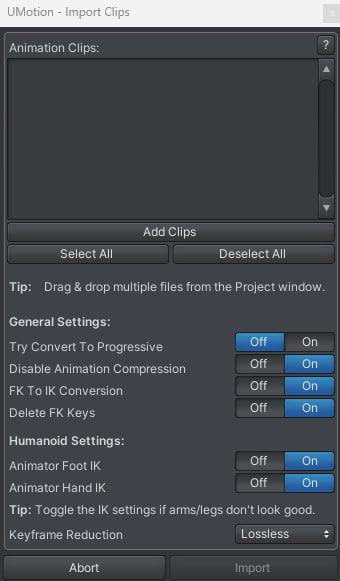
When I set up the import of a clip, I turn off Try Convert To Progressive so that all rotations are in Euler, but I still get Progressive rotations.
Answer
Thank you very much, I hope you will also pay attention to the request for the merge layers feature.

Hi Jekel,
thank you very much for your bug report.
I agree that the naming of this option is a bit misleading. What this option does is that when you import a generic animation and it has quaternion animation curves, it will try to convert them to progressive (if the conversion is lossless).
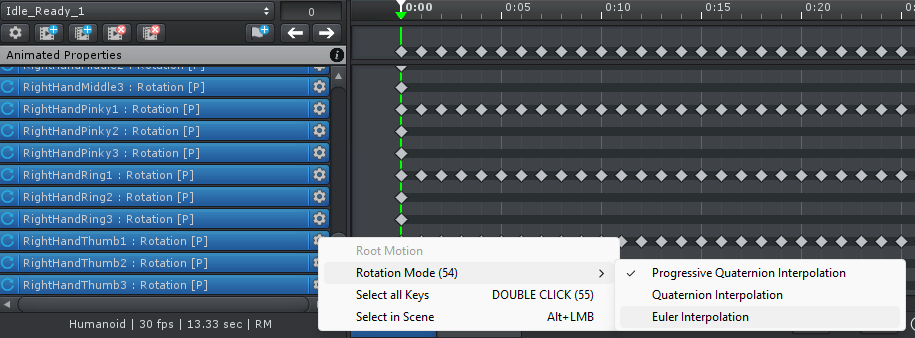
You are probably importing a humanoid animation which rotation curves are always imported using progressive as default. The good new is, you can later convert it to euler by selecting a all properties (select the first one, scroll to the bottom, hold shift while clicking the last one). Then right click on one of them:
Please let me know in case you have any follow-up questions.
Best regards,
Peter


Customer support service by UserEcho

Hi Jekel,
thank you very much for your bug report.
I agree that the naming of this option is a bit misleading. What this option does is that when you import a generic animation and it has quaternion animation curves, it will try to convert them to progressive (if the conversion is lossless).
You are probably importing a humanoid animation which rotation curves are always imported using progressive as default. The good new is, you can later convert it to euler by selecting a all properties (select the first one, scroll to the bottom, hold shift while clicking the last one). Then right click on one of them:
Please let me know in case you have any follow-up questions.
Best regards,
Peter