- UMotion - Animation Editor
-
 Questions

IK handles don't work
I'm following the IK tutorial and used the setup wizard to create handles, but when I move them, the handles just move on their own and no bones move with them. Here's what the wizard created:
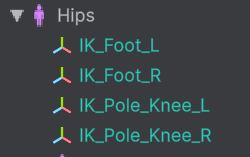
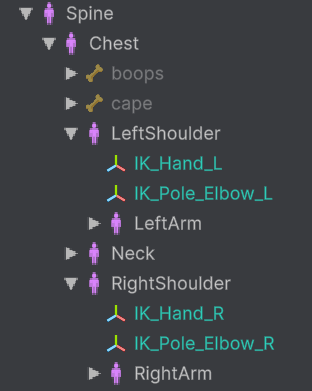
IK_Hand_L constraints:
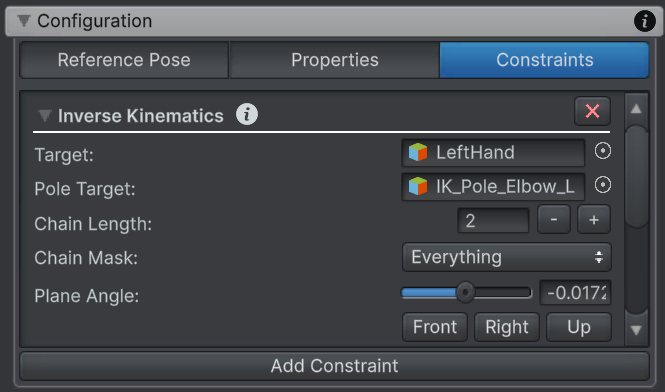
EDIT: Just noticed an error in the console: "Constraint dependency loop! The following joint/transform constraints depend on each other: IK_Foot_L (Inverse Kinematics), IK_Foot_L (Child Of), IK_Foot_R (Inverse Kinematics), IK_Foot_R (Child Of), IK_Hand_L (Inverse Kinematics), IK_Hand_L (Child Of), IK_Hand_R (Inverse Kinematics), IK_Hand_R (Child Of)"
Answer
Found this thread: https://support.soxware.com/communities/1/topics/805-constraint-dependency-loop-ik-not-working-i-dont-know-why
I haven't done any manual IK setup, so I guess this a bug. I sent a bug report email.
I tried using the wizard on a different model and didn't get any errors, but I get the same behavior - only the handles move.
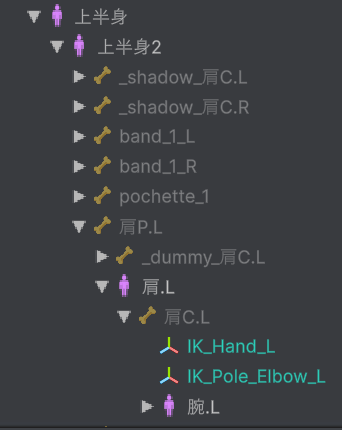
The target is Wrist, which seems correct; however it put the IK transforms under Shoulder, but the Wrist is under Shoulder --> Arm --> Elbow. Does that matter?
I tried with another simpler model with the same results. Then I tried with Robot Kyle in the UMotion example scene/project and get the same thing.

Hi Neon,
thanks for your support request.
, but when I move them, the handles just move on their own and no bones move with them
UMotion uses an FK / IK Blend rig. Your probably have set the blend property to 0 (FK). Please re-watch the IK video tutorial, it's mentioned there.
Constraint dependency loop! The following joint/transform constraints depend on each other: IK_Foot_L (Inverse Kinematics), IK_Foot_L (Child Of), IK_Foot_R (Inverse Kinematics), IK_Foot_R (Child Of), IK_Hand_L (Inverse Kinematics), IK_Hand_L (Child Of), IK_Hand_R (Inverse Kinematics), IK_Hand_R (Child Of)
A constraint dependency loop means your hierarchy is not setup correctly or the IK constraints are not added to the correct transforms in the hierarchy. In other words the result of one constraint depends on the result of another constraint which again depends on the result of the first constraint. This is not a UMotion bug, just a warning that something is not correctly setup in your model.
The IK Setup wizard does some automatic detection and guessing work to determine which transforms to assign the IK constraint to. It is not always guaranteed to be correct. You might need to manually adjust the pre-selections. You can also setup the entire IK manually (without the setup wizard).
Best regards,
Peter
OK, it was the IK blend property that was the problem. Wouldn't it make more sense for the wizard to set this value automatically (otherwise the IK handle serves no purpose)? In the other thread you said,
"When you are using a humanoid UMotion project, and you are only setting
up IK via the IK setup wizard (and do not alter the IK constraints
manually or add constraints manually) you should never get a constraint
dependency loop. If you do get a dependency loop in this case, this is
considered to be a bug..."
This is true in my case, which is why I thought it was a bug. I'll do some investigation into the model.
OK, the problem was that the wizard added the hand IK transforms to the shoulders, which are affected by the hand constraint. This does seem like a bug to me, since I would think the tool should:
1. Walk the heirarchy to check if the chosen parent is within Chain Length of the target, and if so, move it up the hierarchy.
2. When in doubt, just default to hips or object root (for a humanoid I can't imagine a scenario in which you wouldn't want to default to one of these).


Customer support service by UserEcho

Hi Neon,
thanks for your support request.
UMotion uses an FK / IK Blend rig. Your probably have set the blend property to 0 (FK). Please re-watch the IK video tutorial, it's mentioned there.
A constraint dependency loop means your hierarchy is not setup correctly or the IK constraints are not added to the correct transforms in the hierarchy. In other words the result of one constraint depends on the result of another constraint which again depends on the result of the first constraint. This is not a UMotion bug, just a warning that something is not correctly setup in your model.
The IK Setup wizard does some automatic detection and guessing work to determine which transforms to assign the IK constraint to. It is not always guaranteed to be correct. You might need to manually adjust the pre-selections. You can also setup the entire IK manually (without the setup wizard).
Best regards,
Peter