 Bugs
Bugs
"Feature not available"
I have UMotion Pro, yet when I click IK Setup Wizard I get the message, "This feature is exclusive for UMotion Professional users.
Please visit the Unity Asset Store to learn more about UMotion Professional."
When I visit the asset store, it shows that I own the asset. When I click Open In Unity, it shows it as already imported. I've already done a clean reinstall of UMotion, but this issue persists. I don't see anywhere to activate a license or anything like that.
Answer

Hi Neon Specter,
thank you very much for your support request. This message means that you have UMotion Community opened which does not support IK. Make sure that you have only UMotion Pro installed in your Unity project.
Please do the following:
1) Delete all UMotion related folders of any installations
2) Verify, that the UMotion menu items under "Window" in Unitys menu bar are gone:
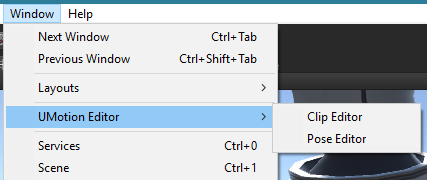
If the menu items are still visible, then there might be a second UMotion installation floating around in your project. You need to delete it as well.
3) After everything is correctly deleted, install UMotion Pro via Unity's package manager again.
Please let me know in case you need any further assistance.
Best regards,
Peter


Customer support service by UserEcho

Hi Neon Specter,
thank you very much for your support request. This message means that you have UMotion Community opened which does not support IK. Make sure that you have only UMotion Pro installed in your Unity project.
Please do the following:
1) Delete all UMotion related folders of any installations
2) Verify, that the UMotion menu items under "Window" in Unitys menu bar are gone:
If the menu items are still visible, then there might be a second UMotion installation floating around in your project. You need to delete it as well.
3) After everything is correctly deleted, install UMotion Pro via Unity's package manager again.
Please let me know in case you need any further assistance.
Best regards,
Peter